
Analytics / Visibility / Prompt
Prompts: the questions you choose to be measured on
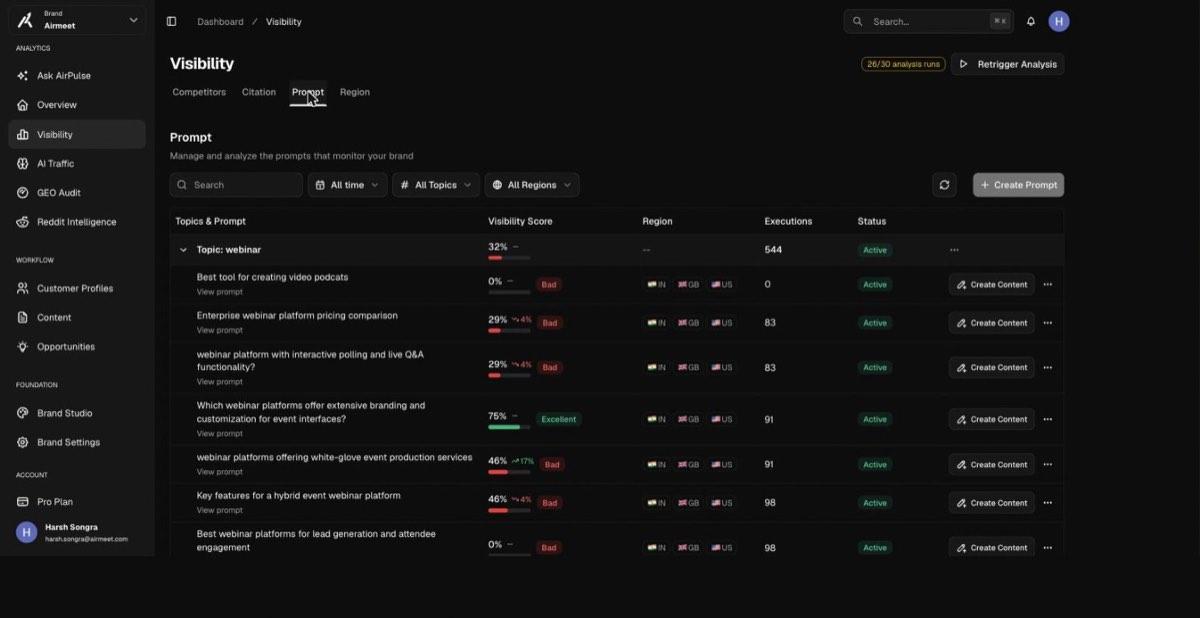
Real questions buyers ask AI engines, grouped by topic, scored per engine and region.
Each prompt row shows its visibility score with a Bad / Excellent label, the regions it runs in, and its execution count. Prompts can be added four ways: manually, by bulk upload, AI-generated from your brand context, or derived from tracked keywords (search volume via a DataForSEO partnership). Once added, analysis runs on the daily schedule. A 0% row is a prompt you are absent from entirely.
Terms on this screen
- Prompt
- A buyer question tracked against the engines, e.g. “Enterprise webinar platform pricing comparison”.
- Execution
- One prompt asked once, on one engine, in one region. Scores aggregate over executions.
- Fan-out query
- The sub-questions an engine expands a query into before composing its answer. Content that covers the fan-out set is what survives the engine’s dedup and answer-planning step.