
The prompt roster is the input set for the measurement methodology: change the roster and the measured result changes with it. The same brand can be absent for broad category questions and visible for a narrow question it answers well. In AirPulse's 45-prompt, four-engine MyChild run, the brand appeared in 23 of 180 response cells, concentrated in open-source and developer-intent questions.
Start with the buyer decision, not the category label
“AI visibility” can mean marketing visibility or software observability. “GEO” can mean generative engine optimization or geospatial analysis. A broad category phrase can pull the wrong market into the answer.
Write the decision first. Examples:
- choose a platform that tracks brand mentions and citations across ChatGPT, Gemini and Perplexity;
- understand why a competitor is recommended but the brand is absent;
- find a tool that connects AI visibility with Search Console and analytics;
- prove whether a content change improved answer-engine outcomes.
Then write the questions a buyer would ask to make that decision. The last decision has its own procedure: turn a prompt roster into a trial.
Use five evidence sources
1. Sales and customer calls
Pull exact questions from discovery, objection, procurement and renewal calls. Record role, buyer stage and product area. Do not publish wording that contains names or confidential context.
2. CRM and support notes
Look for repeated pains, alternatives, requirements and “why not” questions. These produce better evaluation prompts than top-of-funnel keywords.
3. Search Console and site search
Observed queries show existing language and pages with demand. They miss many AI questions but ground the roster in real phrasing.
4. Product and comparison pages
Convert capabilities into buyer questions. “Citation history” becomes “Which tools show how citation sources change over time?”
5. LLM and search expansion
Use ChatGPT, Gemini or another model to fill gaps after the observed evidence is organised. Label generated prompts and review them for ambiguity, duplicates and invented demand. Google's people-first content guidance asks for original information and first-hand analysis; the same applies to a roster.
Organise prompts by buyer stage
| Stage | Purpose | Example |
|---|---|---|
| Problem | Names the pain without a solution category | Why does my AI visibility score change between runs? |
| Category | Looks for an approach or class of product | How do brands measure visibility in AI answers? |
| Evaluation | Compares capabilities or criteria | Which tools repeat prompts and show citation history? |
| Vendor | Names the brand or a direct comparison | AirPulse vs HubSpot AEO |
| Proof | Asks whether an intervention worked | How do I prove that a GEO change improved citations? |
Keep most prompts non-branded. Branded prompts serve reputation monitoring but cannot show whether the brand enters a shortlist before the buyer knows its name.
Add use-case and audience qualifiers only when they change the answer
Qualifiers help when they are a real constraint: enterprise governance, B2B SaaS, healthcare compliance, local services, a specific integration. They add noise when inserted to manufacture pages. Keep one broad parent question and a few decision-relevant variants.
The MyChild case: one brand, three question neighbourhoods
AirPulse's corrected 29/100 MyChild analysis shows why prompt fit matters. A later production run used 45 prompts across ChatGPT, Gemini, Google AI and Perplexity. The aggregate download contains the grouped counts without customer identifiers, raw prompts or raw answers.
| Question group | Mention cells | Rate within group |
|---|---|---|
| Explicit open-source prompts | 12/28 | 42.9% |
| Adjacent developer prompts | 9/24 | 37.5% |
| Other child-development prompts | 2/128 | 1.6% |
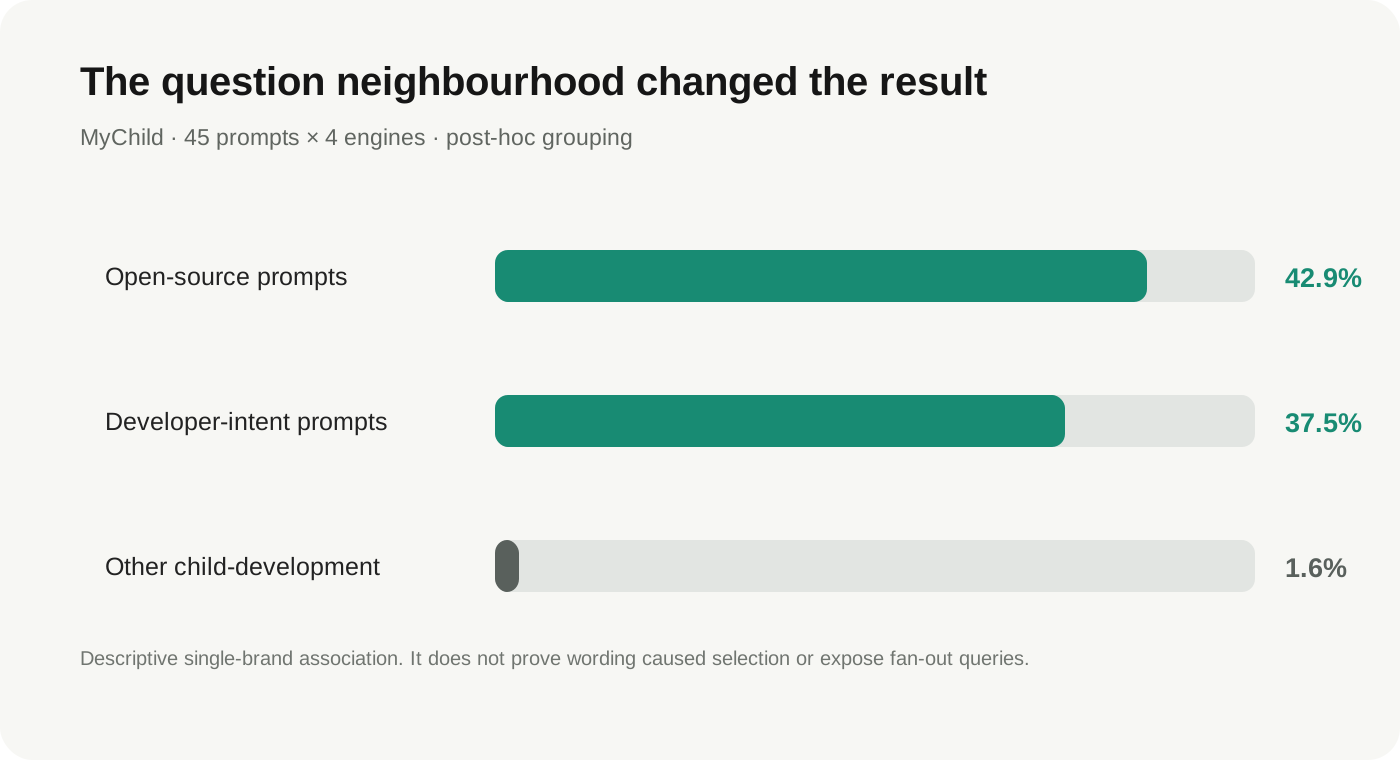
The open-source/developer groups were about 33.75 times more likely than the other group to produce at least one prompt-level mention in that run. The classification was made after observing the data, covers one brand and did not preserve generated fan-out queries. It is a descriptive example, not a rule.
Score each candidate question before adding it
Score six criteria from 0 to 2:
| Criterion | 0 | 1 | 2 |
|---|---|---|---|
| Buyer evidence | Generated only | Indirect signal | Seen in calls, CRM or search data |
| Commercial intent | Informational only | Adjacent to decision | Directly affects selection or action |
| Product fit | AirPulse cannot help | Partial connection | Direct product workflow |
| Evidence advantage | Generic advice | Some internal examples | Original data or repeatable test |
| Wording clarity | Ambiguous category | Needs qualifier | Clear question and market |
| Measurement value | No stable outcome | Secondary diagnostic | Mention, citation or retrieval outcome |
Prioritise prompts scoring 9 or more out of 12. Backlog the rest until better evidence appears.
Build the first roster
For a first roster of 12 to 20 prompts:
- choose three to five business decisions;
- add one problem question per decision;
- add one category or evaluation question per decision;
- add the strongest use-case qualifier where it changes the answer;
- include two or three branded/vendor prompts for reputation context;
- remove duplicates and ambiguous category phrases;
- assign intent, buyer stage, owner and success metric;
- freeze the wording and version the roster.
Do not optimise the roster after seeing the baseline. If a new wording is better, add it as a new version and keep the old series.
Match every prompt to an evidence page
The roster is also a content map. Every important prompt points to one canonical page that answers it completely; several related questions can share a page. For this cluster:
- “How many times should I repeat an AI visibility prompt?”: the 30,504-response study.
- “How should AI visibility be measured?”: the measurement methodology.
- “Which prompts should a brand track?”: this page.
- Product behaviour: Prompt Analysis and Prompt Visibility.
Review quarterly, measure continuously
Keep a frozen core roster for trend continuity. Review it quarterly, or when the category, audience or buyer language changes materially.
During review:
- retain high-value prompts even when the brand is absent;
- retire prompts that no longer represent a buyer decision;
- add new observed questions as a new roster version;
- separate market changes from measurement changes;
- record why each prompt was added, edited or removed.
Run counts, storage and reporting: measurement methodology. Grouping and reviewing the roster in the product: Prompt Analysis.
Download the worksheet
A CSV template with fields for prompt, buyer stage, evidence source, the six criteria, total score, owner and version.